
Key Takeaways
Pick the right battery type. Lithium-ion batteries last longer. They also work better with lots of use than lead-acid batteries. Charge after each use. Do not let the battery go below 20%. This helps keep it healthy. Store your scooter and battery in a cool, dry place. Stay away from very hot or cold spots. This protects the battery. Keep your battery and its connections clean and tight. This stops power loss and sudden stops. Plan your trips on flat, smooth paths. Go at a steady speed to save battery power. Only use the charger that came with your scooter. This stops damage and keeps your warranty safe. Watch for signs like shorter range or slow speed. These signs mean you may need a new battery. Use smart tools like the SanLi Care Model S300 app. It helps you check battery health, get reminders, and avoid mistakes.
Battery Life Factors
Battery Type
The type of battery in your makes a big difference in how long your device runs and how often you need to replace it. You will usually find two main types: lead-acid and lithium-ion.
Lead-Acid
Lead-acid batteries are common in many scooters and wheelchairs. They cost less up front and work well for light, everyday use. However, they do not last as long as other types. Most lead-acid batteries need replacing after about . Their performance can fade over time, especially if you or take long trips.
Lithium-Ion
Lithium-ion batteries are newer and last much longer. They can power your device for or more. These batteries handle more charge cycles and keep their strength longer than lead-acid types. If you use your scooter often or rely on it for long trips, lithium-ion batteries give you better value and longer battery life.
Here is a quick comparison:
| Battery Type | Average Lifespan (Years) | Approximate Charge Cycles | Notes on Performance and Longevity |
|---|---|---|---|
| Sealed Lead-Acid (SLA) | 2-3 | 300-500 | Fades after 2-3 years; budget-friendly |
| Lithium-Ion | 3-5+ | More than SLA | Lasts longer; better for frequent, heavy use |
Tip: The SanLi Care Model S300 uses advanced lithium-ion technology. You can track your battery health and usage with its smart app, helping you get the most out of every charge.
Usage
How often and how far you use your scooter or wheelchair affects battery life. Your habits play a big role in how long your power wheelchair batteries last.
Frequency
Using your scooter every day means you will charge the battery more often. This leads to faster battery wear.
If you use your scooter less often, the battery can last longer—sometimes up to 3 years.
Good charging habits, like charging after each use and not letting the battery drain completely, help extend battery life.
Regular maintenance also keeps your battery strong.
Trip Length
Short trips use less power and put less strain on your battery.
Long trips or using your scooter for many hours each day will use up more charge cycles.
Planning your trips and charging after each use helps you avoid running out of power.
Terrain
Where you drive your scooter or wheelchair changes how much energy the battery uses. Smooth floors and rough outdoor paths affect battery life in different ways.
Indoors
Indoor use is easier on your battery. Flat, smooth surfaces need less power.
Scooters designed for indoors have . They work best in homes, offices, or malls.
You will notice your battery lasts longer when you stay indoors.
Outdoors
Outdoor use drains your battery faster. Uneven ground, hills, and rough paths make your scooter work harder.
to handle these challenges.
If you use an indoor scooter outside, you may see your battery run down quickly.
Note: The SanLi Care Model S300 handles both indoor and outdoor terrain with ease. Its smart features help you monitor battery use, so you always know when it is time to recharge.
Weight
User Load
. When you sit in your power wheelchair, the battery works harder to move you and the chair. This extra work makes the battery lose power faster. Here are some things to remember:
The total weight of you and your wheelchair puts more pressure on the battery.
If you are heavier, the battery has to work even harder and may not last as long.
Some people may need a higher voltage system if they weigh more.
More weight means you might not go as far before the battery runs out.
.
Extra Items
. Every extra pound makes the battery work harder. You might see your wheelchair slow down or need charging sooner when you carry heavy stuff. Try not to bring too many things if you can. If you must carry items, plan your trips and charge your battery so you do not run out of power.
Tip: The SanLi Care Model S300 lets you check your battery in real time with its smart app. You can see how extra weight changes your battery and plan your day better.
Temperature
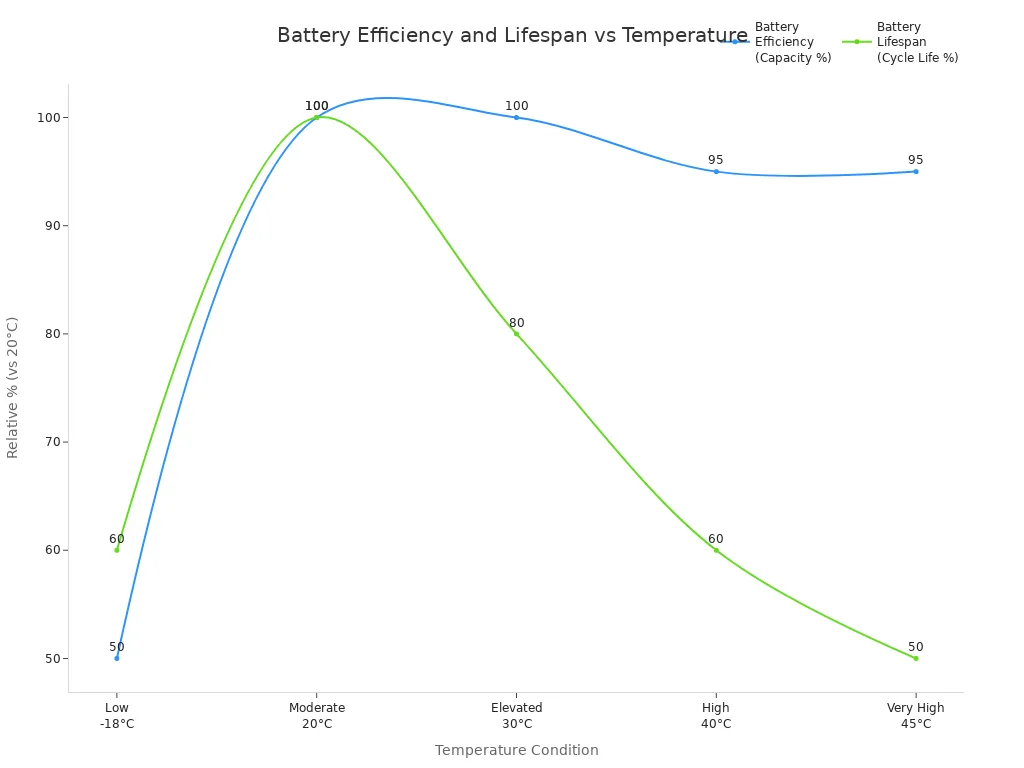
Batteries work best when it is not too hot or too cold. Both hot and cold weather can change how well your battery works and how long it lasts.
| Temperature Condition | Effects on Battery Efficiency | Effects on Battery Lifespan | Additional Notes |
|---|---|---|---|
| Low Temperature (0°F / -18°C) | Capacity drops to about 50%; voltage falls | Reduced capacity; risk of damage | Charging below freezing can harm the battery |
| Moderate (68°F / 20°C) | Best performance and longest life | Maximum cycle life | Ideal for most batteries |
| Warm (86°F / 30°C) | Good performance, but lifespan drops | Cycle life reduced by about 20% | Prolonged heat shortens battery life |
| Hot (104°F / 40°C) | Efficiency loss starts | Cycle life reduced by about 40% | Faster wear and tear |
| Very Hot (113°F / 45°C) | Short-term performance okay | Cycle life cut in half | Overheating risk; avoid leaving in direct sunlight |
Hot
. When it is very hot, your battery might seem fine at first, but it will not last as long. Heat can break down the inside parts of the battery. If you use your wheelchair outside on hot days, try to park in the shade and do not leave it in the sun. The SanLi Care Model S300’s app helps you watch battery temperature and gives alerts if it gets too hot.
Cold
Cold weather slows down how your battery works. Your wheelchair may not go as far or feel as strong in winter. Charging your battery when it is very cold can hurt it. If you use your wheelchair in freezing weather, keep the battery warm before you use it. You can use covers or keep your wheelchair inside to protect the battery.
Note: Watching your weight and the temperature helps your power wheelchair batteries work their best. Smart features, like those in the SanLi Care Model S300, help you track these things and make your battery last longer.
Extend Mobility Scooter Battery Life
Charging
Best Times
Charging your at the right time helps your battery last longer. Always use the charger that came with your scooter. This keeps your battery safe and protects your warranty. After a long ride, let the battery cool for 15 to 30 minutes before charging. Charge your scooter in a cool, dry place between . This helps stop battery damage.
Follow these steps to keep your battery strong:
Plug in your mobility scooter after each use, especially if the battery drops below 30%.
Do not wait until the battery is almost empty. Letting it get too low can make it wear out faster.
, even if you do not use it every day.
Tip: The SanLi Care Model S300’s smart app can remind you to charge and shows your battery’s health right away.
Avoid Overcharging
Overcharging can hurt your mobility scooter battery. If you leave your scooter plugged in after it is full, the battery cells can get damaged. This makes the battery get old faster and not last as long. Most scooters today turn off charging by themselves, but you should still . Always follow the charging rules in your user manual.
Note: Unplug your mobility scooter after 6 to 8 hours of charging or when the light shows it is full. This easy step helps your battery last longer.
Storage
Short-Term
If you will not use your mobility scooter for a few days, keep the battery charged. Store your scooter in a cool, dry place away from sunlight. Make sure the battery is not empty before you store it. For sealed lead-acid batteries, . For lithium-ion batteries, store them at about 40 to 50% charge.
Turn off the scooter so the battery does not drain.
Check the battery level every week and charge if needed.
Long-Term
Long-term storage needs more care. Take the battery out of your scooter if you will not use it for weeks. Store the battery inside at a normal temperature and low humidity. Do not put it in places that are too hot or cold. to keep it healthy.
For sealed lead-acid batteries, charge all the way before storage and top off every two weeks.
For lithium-ion batteries, .
Clean the battery ends before storage to stop rust.
Tip: The SanLi Care Model S300 app can help you watch battery levels and remind you to charge during storage.
Maintenance
Cleaning
Keeping your mobility scooter battery clean helps it work better. Dirt and rust on the battery ends can block power. Use a dry cloth to wipe the battery and ends. If you see white or green stuff, . to stop more rust.
Clean the battery area every month.
Keep the battery dry to stop rust and power problems.
Checking Connections
Loose or dirty connections can make your mobility scooter lose power or stop. Check the battery cables, nuts, and screws often. Tighten any loose parts. Look for broken wires or clips. Fix problems right away to stop bigger issues.
Note: Cleaning and checking connections often helps stop sudden problems. The SanLi Care Model S300’s smart features can warn you about battery or connection problems before they get worse.
A good maintenance routine keeps your mobility scooter working well. You will have fewer problems and enjoy longer rides. These habits protect your mobility scooter battery and help you stay independent.
Mistakes
Everyone wants their mobility scooter to last a long time. But some mistakes can make your battery wear out faster. If you know what not to do, your scooter will work better every day. Here are some and how to stop them.
| Common User Mistake | Impact on Battery Life | Recommended Solution |
|---|---|---|
| Using generic chargers | Battery damage and reduced performance | Use manufacturer-recommended chargers |
| Neglecting battery maintenance | Unexpected battery failures | Perform regular checks and clean terminals |
| Infrequent charging | Decreased battery lifespan and efficiency | Charge regularly, ideally after each use |
| Improper storage | Battery deterioration and reduced lifespan | Store in a cool, dry place |
| Overcharging or undercharging | Battery damage and shortened lifespan | Follow proper charging times and avoid full discharge |
Draining Battery
Letting your battery run all the way down is very bad. If you ride until it is almost empty, the battery cells get stressed. Doing this a lot makes your battery weaker and it will not last as long. Some people think using all the power before charging is good, but that is not true for modern batteries.
You should charge your scooter after every use, even for short trips. If you will not use your scooter for a few days, make sure the battery is not empty. For sealed lead-acid batteries, charge them right after every ride. For lithium-ion batteries, keep the charge above 30%. Do not let the battery get too low because it can get damaged forever.
Tip: The SanLi Care Model S300’s smart app can remind you to charge before your battery gets too low. This helps you avoid deep discharges and keeps your battery healthy.
Wrong Charger
Using the can ruin your scooter battery. Generic chargers might not match your battery’s voltage or speed. This can make the battery overheat, charge slowly, or get damaged. Some chargers do not stop when the battery is full, which can overcharge and hurt the battery.
Always use the charger that came with your scooter or one the company says is safe. If you lose your charger, ask the company for a new one. Do not use a charger that is not made for your scooter.
Only use the charger made for your scooter.
Turn off your scooter before plugging it in.
Check the charger and cables for damage before you use them.
Note: The SanLi Care Model S300’s app can warn you if there is a charging problem. This smart feature helps you fix mistakes early and protect your battery.
If you avoid these mistakes, your scooter will last longer and work better. Good habits and smart tools help you keep your battery strong.
Signs to Replace Mobility Scooter Battery
It is important to know when to get a new mobility scooter battery. This keeps you safe and able to move around. Batteries do not last forever. You can spot problems before your scooter stops working. Here are ways to see warning signs, test your battery, and know when to get a new one.
Red Flags
Your mobility scooter shows signs when the battery is getting weak. Watch for these clues:
Short Range
If your scooter cannot go as far as before on one charge, the battery may be getting old. You might need to charge more often or not finish your normal trips. A is usually the first sign your battery needs help.
Slow Speed
A good battery lets your scooter go at normal speed. When the battery gets old, your scooter may move slower. It might have trouble going up ramps or hills that were easy before. Slow speed means the battery cannot give enough power.
Tip: Other signs are trouble charging, cracks or bulges on the battery, power that turns off and on, or sudden stops. If your scooter will not keep a charge, the battery probably needs to be replaced.
Testing
You can check your mobility scooter battery at home or ask a pro for help. Testing helps you know if the battery is still good or if you need a new one.
Voltmeter
A voltmeter is a tool that checks battery voltage. Here is how to use it:
Turn off your mobility scooter and put on gloves.
Set your voltmeter to DC voltage (12 or 24 volts).
Touch the probes to the battery ends, matching plus and minus.
A full 12-volt battery should show .
If the number is much lower, your battery may need charging or replacing.
For a better check, use a load tester. Put a load on and watch the number. If it , the battery is weak.
A battery that drops to zero or cannot keep a charge is damaged inside. You should recycle it and get a new one.
Professional Help
If you are not sure how to test, ask a trained technician or call your scooter company. Pros have special tools to check battery health and find hidden problems. They can also look for loose wires or rust that cause power trouble.
Note: The SanLi Care Model S300 app helps you watch battery health and warns you early. This makes it easier to know when to get help.
Upgrade Time
Sometimes, getting a new mobility scooter battery is the best idea. Age and new technology both matter.
Battery Age
Most lead-acid batteries last . Gel and AGM batteries last about 2 to 3 years. Lithium-ion batteries can last . If your battery is older than these times, it is probably time for a new one. Old batteries lose power and can stop working without warning.
| Battery Type | Typical Lifespan | Charge Cycles | Weight | Upfront Cost | Maintenance Needs |
|---|---|---|---|---|---|
| Lead-Acid (SLA/AGM) | 1-2 years | 200-400 cycles | Heavy | Low | Needs regular, full charges |
| Lithium-ion (LiFePO4) | 2-5+ years (up to 10) | 1000-2000+ cycles | Light (~1/3 of SLA) | High | Less sensitive to charging state |
New Tech
New battery technology gives you better power and longer life. Lithium-ion batteries, like those in the , last longer and weigh less than old types. They also need less care and can handle more charges. Getting a modern battery can save money over time and keep your scooter working well.
Callout: If your scooter’s battery is old or you want better range and dependability, think about getting a lithium-ion battery. You will have more freedom and worry less about running out of power.
Daily Mobility Scooter Habits
Making good habits every day helps your battery last longer. Simple routines keep your scooter ready to use and help it work well for a long time.
Charging Routine
After Use
Charge your after each ride. This keeps your battery full and ready for next time. Most companies say to plug in your scooter at the end of the day, even if you only went a short distance. Always . Charging in a cool, dry place helps stop battery damage.
so your scooter is always ready.
Use the charger that came with your scooter for safety.
If you took a long ride, let the battery cool before charging.
Tip: Charging after every ride stops deep discharges. This helps your battery last longer.
Avoid Partial Charges
Try not to charge your scooter for just a few minutes. Short charges can confuse the battery and make it wear out faster. It is better to charge all the way when you can. Do not let the battery drop below 20% before charging. helps it last longer.
Do not charge for just a short time.
Try not to let the battery get too low.
Use a charger that turns off by itself to stop overcharging.
Monitor Health
Battery Indicator
Your mobility scooter has a that shows how much power you have left. Check this before every trip. Watching the indicator helps you avoid running out of power far from home. Some scooters, like the SanLi Care Model S300, have smart apps that show battery health, temperature, and charging in real time.
Note: Checking your battery’s charge and temperature helps you find problems early and keeps your battery safe.
Usage Log
Keeping a simple log helps you see how often you charge and how far you go. Write down the date, how far you traveled, and the battery level after each ride. Over time, you will see if your battery is losing power or needs charging more often. This record helps you change your habits and spot problems before they get worse.
| Date | Trip Distance | Start Battery | End Battery | Notes |
|---|---|---|---|---|
| 06/01/2024 | 3 miles | 100% | 70% | Normal use |
| 06/02/2024 | 5 miles | 100% | 60% | Battery drained faster |
Trip Planning
Efficient Routes
. Pick the shortest and flattest way to go. Try not to use steep hills or rough paths because these use more energy. Riding at a steady, slow speed also helps your battery last longer.
.
Skip extra turns and steep hills.
Keep your speed steady and not too fast.
Avoid Full Drain
Never let your mobility scooter battery run out all the way. Try to . This keeps your battery safe from deep discharge, which can hurt it forever. If you want to go far, check your battery first and bring your charger if you need it.
Callout: Good planning and checking your scooter often helps you avoid getting stuck and keeps your mobility scooter working well.
Troubleshoot Battery Life Issues
Not Holding Charge
If your does not hold a charge, you may feel frustrated or worried about getting stuck. Many things can cause this problem. You can use the and what you can do about them:
| Cause | Explanation | Solution |
|---|---|---|
| Natural Battery Degradation | The battery gets weaker over time and after many charges. | Replace the battery every 1-2 years (lithium-ion) or 2-3 years (standard). |
| Faulty or Defective Chargers | A broken charger gives poor or no power to the battery. | Test with another charger or use a voltmeter to check. |
| Loose or Corroded Connections | Dirty or loose battery ends stop the battery from charging well. | Clean contacts with isopropyl alcohol and tighten connections. |
| Damaged Batteries | Drops or bumps can break the battery inside, causing heat or strange noises. | Replace damaged batteries right away for safety. |
| Improper Charging Procedures | Charging too little, too often, or storing in hot/cold places hurts the battery. | Charge fully in one session and store in a cool, dry place. |
| Voltage Converter Issues | The part that changes wall power for your charger can wear out. | Test and replace the converter if needed. |
Tip: Always check your charger, cables, and battery for damage. Follow the instructions from your scooter’s manual to keep your battery healthy.
Charger Problems
can stop your scooter from charging or make charging slow. You can fix many of these issues at home. :
Make sure the charger plugs in all the way. Check that the cables and connectors are not broken.
Test the wall outlet with another device, like a lamp, to see if it works.
Look at the charger’s lights. If they do not turn on, the charger may be broken.
Inspect the charger cables for cuts or frays.
Use a multimeter to check the battery voltage. A low number means the battery may be bad.
Clean the battery contacts with a dry cloth or a little baking soda if you see rust.
Always use the charger that came with your scooter. Other chargers can damage your battery.
If you still have problems, ask a professional for help or contact customer service.
Note: The SanLi Care Model S300’s smart app can alert you to charging issues, making it easier to spot and fix problems early.
Sudden Power Loss
can feel scary, especially if you are far from home. This problem often comes from wiring or battery issues. Here are some things you can check:
Look for loose wires or connectors. Vibrations can make them come loose over time.
Check the battery. If it is old or has poor connections, it may stop working without warning.
Make sure you do not overload your scooter. Carrying too much weight or riding for a long time can cause overheating and shut down.
Take breaks during long rides to let your scooter cool down.
. Water, rain, or rust can cause short circuits and sudden stops. Use a waterproof cover and store your scooter in a dry place.
If you still lose power after checking these things, you may need a new battery or help from a technician. Regular checks and good care help prevent sudden problems and keep you moving safely.
Error Messages
When you see an error message on your mobility scooter display, it means your scooter has found a problem. These messages help you know what is wrong so you can fix it quickly. Understanding these codes keeps your scooter safe and running well.
Most error messages point to battery health or system issues. You might see a warning like “Low Battery” or just the letter “L.” This means your battery is running low and needs charging soon. If you ignore this message, your scooter could stop working in the middle of a trip.
Sometimes, you will see other codes like “E” for engine or motor problems, or “C” for controller issues. These codes tell you that something in the scooter’s system is not working right. You might also see flashing lights instead of letters or numbers. Each pattern of flashes stands for a different problem, such as a brake fault, throttle issue, or wiring problem.
Here is a quick guide to common error messages:
| Error Code or Message | What It Means | What You Should Do |
|---|---|---|
| L or Low Battery | Battery is low or weak | Charge your battery soon |
| E or Engine | Motor or engine problem | Check motor connections, call a pro |
| C or Controller | Controller or system issue | Inspect wiring, consult manual |
| Flashing Lights | Specific component fault | Count flashes, check user manual |
Tip: Always check your scooter’s user manual for the exact meaning of each code. Different brands use different codes.
If you see a , check your battery connections first. Loose or dirty connections can cause these errors. Make sure the cables are tight and clean. If the error stays after you check the connections, your battery may be failing. You might need a new battery soon.
System error messages can also point to wiring faults or loose connectors. Look for any wires that are not plugged in all the way. If you find a loose wire, push it in gently. If you see any broken wires or damaged parts, do not try to fix them yourself. Call a technician for help.
Regular maintenance and quick action when you see error messages help keep your scooter safe and reliable.
If you cannot clear the error after basic checks, do not keep using your scooter. Using it with a system fault can make the problem worse. Always ask a professional if you are not sure what to do.
Staying alert to error messages and knowing what they mean helps you avoid bigger problems. You will enjoy more worry-free rides and keep your independence.
Choose the Right Mobility Scooter Battery
Match Type
Picking the right battery means finding one that fits your scooter. Check your scooter’s manual or look at your old battery’s label. Most scooters use sealed lead-acid, gel, or lithium-ion batteries. Each type has its own good points. Sealed lead-acid batteries are heavy and cost less. Lithium-ion batteries are light, last longer, and work better. Gel batteries are in the middle. They are safe and do not need much care.
Always make sure the battery matches your scooter’s voltage and size. Using the wrong battery can hurt your scooter or make it work badly. If you have a , you need a lithium-ion battery made for smart features and longer life. The right battery keeps your scooter safe and working well.
Tip: If you do not know which battery to get, ask an expert or go to a store with staff who can help.
Battery Ratings
Battery ratings show how far and how long your scooter can go. Look for numbers like voltage and amp-hours on the battery label. The voltage must match what your scooter needs. Most scooters use 12V or 24V batteries. Amp-hours tell you how much energy the battery holds. A higher amp-hour number means you can go farther before charging.
When you look at batteries, think about these things:
Battery type: Sealed lead-acid batteries are cheap but heavy. Lithium-ion batteries are lighter and last longer.
Capacity: More capacity means you can go farther, but it might weigh more.
Warranty: A good warranty means the battery is likely to last. Compare warranties from different brands.
Lifespan: Most batteries last from . Lithium-ion batteries usually last longer.
Maintenance: Keep the battery ends clean and do not let it run out all the way.
Compatibility: Make sure the battery fits your scooter’s voltage and size.
Price: Sealed lead-acid batteries cost less. Lithium-ion batteries cost more but last longer.
Here is a table to help you compare:
| Battery Type | Weight | Lifespan | Price Range | Maintenance | Warranty |
|---|---|---|---|---|---|
| Sealed Lead-Acid | Heavy | 18-36 months | $30+ | Moderate | 6-12 months |
| Gel | Medium | 24-36 months | $60+ | Low | 12 months |
| Lithium-Ion | Light | 36-60 months | $200+ | Low | 12+ months |
Try to balance how much the battery holds, how heavy it is, and the price. Always check the warranty and ask for help if you have questions.
Where to Buy
You can buy mobility scooter batteries in many places, but it is best to pick a trusted store. Stores like have staff who know a lot about batteries. They help you find the right battery for your scooter. You can get free battery testing and free installation when you buy a new battery there. Use their store locator to find a shop near you.
At Batteries Plus, you get free battery checks and help with putting in your new battery. The staff can answer your questions about different batteries and help you pick the best one. They also give tips on how to take care of your battery. If you are not sure which battery to get or how to put it in, you can get help in the store.
Note: Buying from a good store gives you peace of mind. You get support, a warranty, and advice to keep your scooter working well.
Install Tips
in your mobility scooter is an important task. Doing it right keeps you safe and helps your scooter work its best. Follow these steps to make sure you install your battery correctly:
Turn off your scooter and remove the key. This step stops any chance of the scooter turning on by accident.
Place your scooter on a flat, stable surface. This keeps the scooter from moving while you work.
Unplug the charger. Never try to change the battery while the charger is connected.
Open the battery compartment. Most scooters have the battery under the seat or behind a panel. Check your manual if you are not sure.
Disconnect the old battery. Start with the negative (-) cable first. This helps prevent short circuits. Then remove the positive (+) cable.
Lift out the old battery carefully. Batteries can be heavy. Use both hands and proper lifting techniques to avoid injury.
Clean the battery compartment. Wipe away any dirt or residue. Clean terminals help the new battery work better.
Place the new battery in the compartment. Make sure it sits flat and does not move around.
Connect the new battery. Attach the positive (+) cable first, then the negative (-) cable. Tighten the connections so they do not come loose.
Close the battery compartment. Make sure it is secure before you use your scooter.
Test your scooter. Turn it on and check that everything works. Look at the battery indicator to see if the new battery is connected right.
Tip: Always use a battery that matches your scooter’s voltage and type. For smart scooters like the SanLi Care Model S300, use only approved lithium-ion batteries to keep all features working.
Extra Safety and Maintenance Tips:
, even short trips. This keeps it healthy.
Do not overcharge. Unplug the charger once the battery is full.
Clean the battery terminals every month to stop corrosion.
Store your scooter and battery in a cool, dry place. Avoid very hot or cold spots.
Handle batteries with care. Dropping them can cause damage or leaks.
If you see any damage or have trouble, ask a professional for help.
Take old batteries to a recycling center. Never throw them in the trash.
Note: Good installation and care help your battery last longer and keep your scooter running smoothly. Following these steps gives you peace of mind every time you ride.
You can make your battery last longer by following these secrets. Simple habits each day help you stay independent and feel sure of yourself. Use these tips and see your battery work better.
Tell other mobility scooter users about what you learn.
Keep moving and have fun on every ride with a strong battery.
Remember: Taking care of your battery every day helps you stay free and worry less.
FAQ
How often should you charge your mobility scooter battery?
You should charge your battery after every use. This habit keeps your scooter ready and helps the battery last longer. Avoid letting the battery drop below 20%. Charging regularly prevents deep discharges and protects battery health.
Can you use any charger with your power wheelchair?
No, always use the charger that comes with your scooter or one approved by the manufacturer. Using the wrong charger can damage your battery and may void your warranty. The SanLi Care Model S300 app can alert you if it detects a charging issue.
What is the average lifespan of a lithium-ion battery?
Most lithium-ion batteries last 3 to 5 years. You may get up to 1,000 charge cycles with good care. Factors like temperature, charging habits, and usage affect battery life. The lets you track battery health with its smart app.
Does cold weather affect your scooter’s battery?
Yes, cold weather can lower your battery’s performance. Your scooter may not go as far in winter. Keep your battery warm before use and avoid charging it in freezing temperatures. Store your scooter indoors when possible.
How do you know when to replace your battery?
Watch for signs like shorter range, slow speed, or trouble holding a charge. If your battery is over three years old or shows these signs, consider replacing it. The SanLi Care Model S300 app can warn you when your battery health drops.
Can you travel by plane with your SanLi Care Model S300?
Yes, the is airline-approved. Its lightweight, foldable design and lithium-ion battery meet most airline rules. Always check with your airline before you travel and inform them about your mobility device.
What should you do if your scooter suddenly loses power?
First, check the battery indicator and connections. Make sure the battery is charged and the cables are tight. If the problem continues, consult your user manual or contact customer support. The S300 app can help you spot issues quickly.
How can you make your battery last longer each day?